
How to Set Confidence Thresholds for Document AI Review
Impleko AI · 9 min read
Learn how to set confidence thresholds that route risky invoice and form fields to a human reviewer and auto-approve the rest, with a tiered, field-level method.
Key Takeaways
- Set confidence thresholds per field, not per document. A vendor name and a payment amount carry very different risk, so they need different cutoffs.
- Route a field to a person when its confidence is below the threshold, when a business rule fails (totals do not add up, no matching purchase order), or when the dollar amount is high.
- Pick thresholds from your own labeled sample. Measure how many errors would slip through at each cutoff, then choose the point where the error rate is acceptable to the person who owns the process.
- Keep sampling auto-approved documents. A small random audit catches drift that confidence scores alone will not show.
- Plain rules often beat model confidence for catching bad extractions. Use both together.
What is a document AI human review queue?
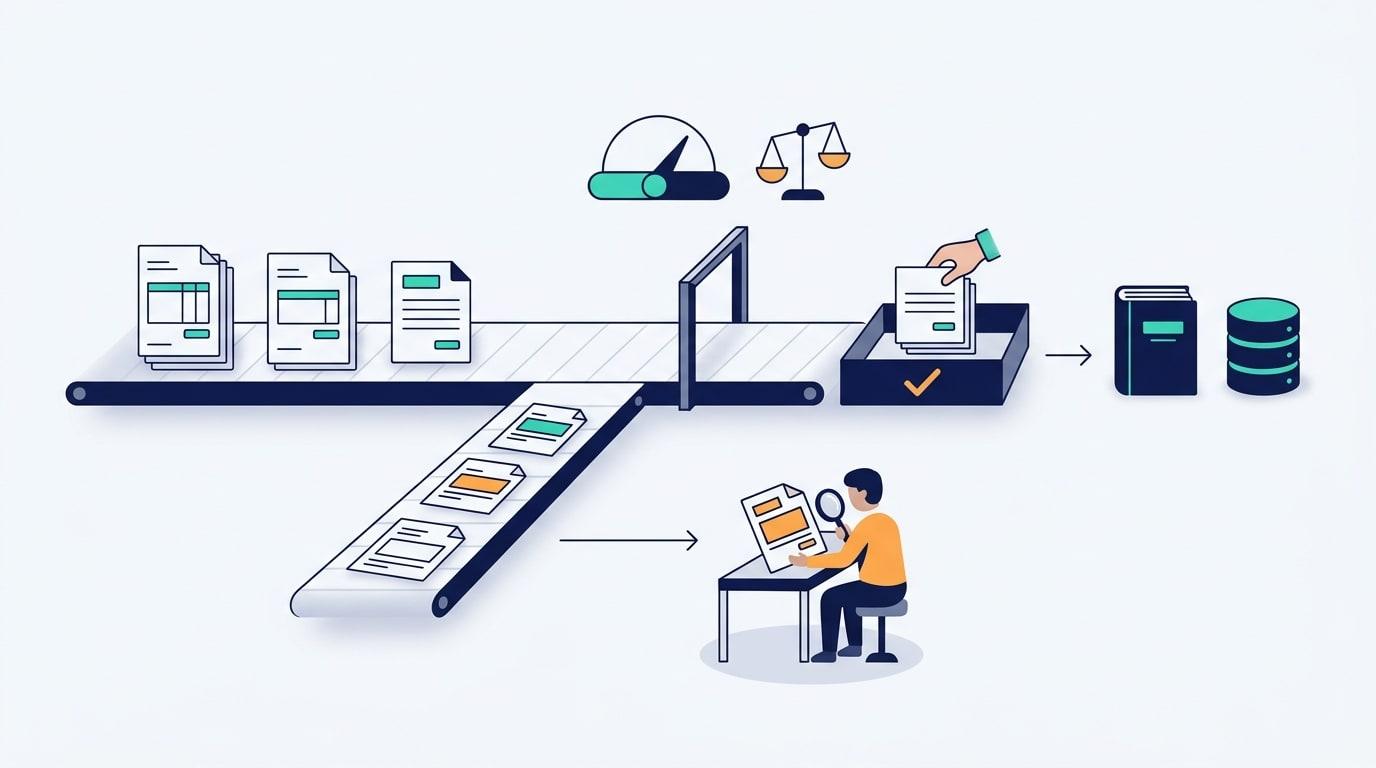
A document AI human review queue is a list of extracted invoices, forms, or fields that the system is not sure enough about to approve on its own, so a person checks them first. Everything the system is sure about flows straight into your accounting, CRM, or claims tool without a human touching it.
The goal is not to review everything or nothing. It is to spend human attention only where a wrong value would cost more than the review does. A confidence threshold is the cutoff that decides which side each field lands on.
What does a confidence score actually tell you?
A confidence score is the model's own estimate of how likely an extracted value is to be correct, usually shown as a number between 0 and 1. It is a useful signal, but it is an estimate, not a guarantee, and different vendors calculate it differently.
Microsoft's documentation on Microsoft Learn, accuracy and confidence scores for Document Intelligence, explains how to interpret these scores and why you should validate them against your own documents. A score of 0.90 from one service does not mean the same thing as 0.90 from another, and neither is a promise that nine in ten values are right on your invoices.
Two practical consequences follow:
- Never copy a threshold from a blog post or a vendor demo. Calibrate on your own documents.
- Confidence can be high and still wrong, for example when a clean-looking scan has the wrong column read as the total. That is why rules and sampling matter.
How do you set a confidence threshold for each field?
Start by sorting fields by the cost of a mistake, then give each tier its own threshold. High-risk fields get a strict cutoff or always go to review, low-risk fields get a relaxed one. Tune the numbers against a labeled sample of your own documents.
Here is a simple tiering model:
| Field tier | Example fields | Cost of an error | Suggested routing |
|---|---|---|---|
| Critical | Total amount, bank account number, tax ID | Wrong payment, fraud exposure, compliance issue | Very high threshold, or always review above a set dollar amount |
| Important | Invoice number, due date, vendor name | Duplicate payments, late fees, misrouted records | High threshold plus a rule check |
| Low risk | Memo text, ship-to line 2, internal reference | Minor cleanup later | Relaxed threshold, auto-approve |
Then work through these steps:
- Collect a labeled sample. Pull a few hundred real documents across your common vendors and form types, and have someone mark the correct value for each field.
- Run extraction and record confidence per field. Keep the predicted value, the score, and whether it matched the label.
- Sweep thresholds. For each field, compute how many values would be auto-approved at each cutoff and how many of those would be wrong.
- Choose by tolerated error, not by queue size. Decide the acceptable error rate for each tier first, then pick the lowest threshold that meets it.
- Check the workload. If the resulting queue is too large for your team, improve the model or add rules before you lower the bar on critical fields.
How do you decide the right error rate to tolerate?
The right error rate is the one where the cost of the occasional wrong value is lower than the cost of reviewing everything. That is a business decision, so the process owner should set it, not the engineer tuning the model.
Say a team processes 1,000 invoices a week, and a reviewer takes about a minute per flagged field group. If lowering a threshold sends 150 fewer documents to review but lets through a handful of wrong totals, you need to know what a wrong total costs you: a clawed-back payment, a vendor dispute, an audit finding. This is an illustrative example, not real data, but the arithmetic is the same on real numbers.
Write the tolerated error rate down per tier. Critical fields usually tolerate almost none, while memo text can tolerate plenty.
Which fields should always go to a person?
Fields that move money, identify a person, or create legal exposure should have a human gate regardless of confidence, at least above a set value. A high score does not change what a mistake costs.
Common always-review triggers:
- Payment amounts above a dollar limit you define
- First invoice from a new vendor
- Changed bank details for an existing vendor
- Handwritten or low-quality scans
- Forms with missing required fields
- Anything involving health, identity, or financial eligibility data
This is the human in the loop pattern: the machine does the reading, the person owns the decision on the risky cases.
Do business rules work better than confidence scores?
Business rules catch many errors that confidence scores miss, because they check the extraction against facts the model does not know. A plain rule is cheaper, faster, and easier to explain than a model, so use rules wherever you can state the check in one sentence.
Useful validation rules for invoices and forms:
- Line items must sum to the subtotal, and subtotal plus tax must equal the total
- The vendor must exist in your vendor list
- The invoice number must not already exist (duplicate check)
- The PO number must match an open purchase order, and the amount must be within tolerance
- Dates must be valid and not in the future or too far in the past
- Required fields must be present
Any failed rule sends the document to review, even if every field scored high. A good setup combines both signals: low confidence or a failed rule means review, and both clean means auto-approve.
How do you keep the review queue accurate over time?
Sample a small random slice of auto-approved documents each week and have a person check them. This audit shows the real error rate hiding behind your thresholds and tells you when to tighten or loosen them.
Reviewer corrections are also data. Log every edit with the field, the original value, the corrected value, and the vendor or form type. Patterns show up quickly: one vendor's layout consistently trips the total field, or a new form version breaks a date field.
Revisit thresholds when something changes:
- A new vendor or form template enters volume
- You switch or upgrade the extraction model
- Reviewers start overriding a field more often than before
- The audit sample shows errors in a tier you considered safe
Where the model is a large language model (such as Claude or OpenAI models) reading documents, confidence is often less direct than in a classic OCR service. In that case, as in the LLM-based pipelines Impleko AI builds, lean harder on rule checks, a second-pass verification prompt, and sampling.
What tools can route documents to a review queue?
Most document AI services return per-field confidence, and a workflow tool applies your thresholds and routes the result. The routing logic is simple enough that you do not need custom software to start.
Options include the human review features in cloud services such as Amazon Augmented AI, or a workflow built in n8n, Make, or Zapier that reads the confidence values, runs your rules, and sends flagged items to a review screen, Slack message, or ticket. Approved documents then post to your accounting or CRM system automatically.
Impleko AI builds this kind of pipeline for teams that do not have an in-house AI group: extraction, rule checks, a review queue with reviewer corrections logged, and the handoff into the systems you already use. Impleko AI usually starts with a working proof of concept on a few hundred of your own documents, because that is the fastest way to see where your thresholds should sit.
What mistakes should you avoid when setting thresholds?
The most common mistake is using one global threshold for every field. It either floods reviewers with harmless low-risk fields or lets critical errors through.
Other mistakes to avoid:
- Tuning thresholds to hit a target queue size instead of a target error rate
- Trusting vendor default thresholds without testing them on your documents
- Skipping the audit of auto-approved documents
- Treating confidence as the only signal and ignoring math and lookup checks
- Making reviewers re-key whole documents when they only need to confirm one flagged field
Show the reviewer the source image beside the extracted value, highlight only the flagged field, and let them fix it in one click. Fast review keeps the queue sustainable.
Frequently Asked Questions
What confidence threshold should I use for invoice extraction?
There is no universal number, because scores differ by service and by your documents. Calibrate on a labeled sample of your own invoices, set stricter cutoffs for fields like totals and bank details, and relax them for low-risk fields.
Should I set thresholds per field or per document?
Per field. A document can have a clear vendor name and an unclear total, and only the total needs a person to look at it. Field-level routing keeps the review queue small and focused.
Can I auto-approve everything above a high confidence score?
Not safely for money-moving fields. A high score can still be wrong, so pair it with rule checks such as totals math, vendor lookup, and duplicate detection, and keep a dollar limit above which a person always reviews.
How many documents do I need to calibrate thresholds?
A few hundred real, labeled documents across your common vendors and form types is a practical starting point. Use more if your layouts vary widely or if a field is rare, since you need enough examples of each to see its true error rate.
How do I know if my thresholds are too loose?
Audit a random sample of auto-approved documents each week. If a person finds errors in fields you considered safe, or reviewers override a field more often than before, tighten that field's threshold or add a validation rule.